
Angle Grinder Vibrating or Wobbling? Causes and Safe Fixes
If your angle grinder is vibrating or wobbling, stop using it immediately to avoid a mechanical failure or a shattered disc. Unplug the tool or remove the battery to prevent accidental activation, then inspect the disc and locking nut for damage as part of your safe fixes.
Stop your angle grinder from vibrating
If you notice your tool shaking, follow these steps to secure the area and prevent injury.
Disconnect the power source by pulling the plug or sliding out the battery pack. Never rely on the tool’s off switch alone, as a short circuit can trigger an unexpected restart.
Place the tool on a flat, stable surface where it can’t roll or fall. If the vibration was severe, inspect the workbench for loose fasteners that may have migrated during the event.
Check that the disc isn’t cracked or missing any teeth while the tool is off. A hairline fracture often hides under the mounting flange; if you see a jagged line, discard the blade immediately.
Tighten the locking nut by hand to see if it moves or feels loose on the spindle. If the nut spins freely, the threads are likely stripped.
Wait for the motor to cool down completely before you touch any metal parts.
Why tools start to shake
An angle grinder vibrating or wobbling usually happens because the abrasive disc isn’t seated perfectly on the spindle. When the disc is off-center, the mass of the spinning wheel creates an uneven force that pulls the tool in different directions.
This is most common when the inner flange or the locking nut has debris trapped behind it, preventing a flush fit. If the disc itself is warped from heat or improper storage, it will also create a rhythmic pulse that travels through the handle into your hands.
Another common cause is a damaged or bent spindle shaft. If the tool was dropped while the disc was attached, the force can warp the metal spindle. If your machine makes a grinding or clicking noise along with the shake, the internal gears may have lost teeth or lost their lubrication.
Simple checks for your tool

Check these parts in this order to find the source of the wobble without spending money.
Inspect the abrasive disc
Look for visible cracks, chips, or uneven wear patterns on the edges of the wheel. A disc that shows heavy wear on one side is unbalanced and must be replaced. Never use a cracked disc, as it will likely explode under high rotational speeds.
Clean the mounting flanges
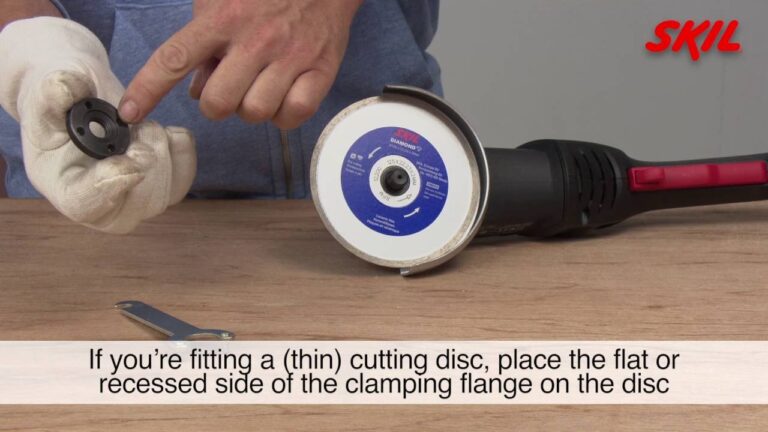
Remove the nut and the inner flange to clear away metal dust or grit. Even a tiny piece of debris can stop the disc from sitting flat against the spindle. Wipe both surfaces with a clean cloth until they’re smooth and free of buildup.
Test the spindle nut
Ensure the threads are clean and the nut spins freely onto the shaft by hand. If it feels gritty or gets stuck, the threads might be damaged. A loose nut is a primary cause of wobble, so verify it locks the disc firmly in place.
Check the spindle shaft
Spin the shaft by hand while the tool is unplugged to feel for any resistance or grinding. It should rotate smoothly without any wobble or side-to-side play. If you feel a “click” or catch while turning, the internal bearings are likely failing.
Verify the guard position
Make sure the safety guard is tightened and doesn’t touch the disc. A loose guard can vibrate against the spinning wheel, causing a rattling sensation that mimics a mechanical wobble. Adjust the guard until it’s secure and clears the disc by at least 3 millimeters.
Fixing the wobble
The most likely fix involves cleaning the mounting surfaces and installing a new, high-quality disc. Start by removing the current disc and cleaning the spindle threads with a stiff nylon brush to remove packed-in dust. Inspect the inner flange for any deep gouges that might prevent a flat connection.
If you find deep scratches, the flange is damaged and needs replacing, as it will never hold a disc perfectly center. Install a new disc, ensuring it sits flush against the inner flange, and tighten the outer nut firmly with the provided pin wrench.
Once tightened, spin the disc by hand to confirm it rotates true without any side-to-side movement. If the disc looks perfectly flat while spinning, plug the tool in and run it at a low speed for 30 seconds to test for stability. A successful fix results in a smooth, consistent hum without any shaking in the handle.
When to see a professional

If you have replaced the disc and cleaned the flanges but the tool still vibrates, the problem is likely inside the motor housing. You should stop all DIY attempts if you feel heat coming from the gear casing or hear a loud, irregular clatter when the motor spins. These are signs of failing internal bearings or stripped gear teeth, which require specialized tools to repair.
Take the grinder to a certified power tool service center to have the internal drive train inspected. A professional technician will use a dial indicator to check the spindle’s true alignment, which is the only way to confirm if the shaft is bent beyond repair.
If the vibration persists but the casing remains cool and quiet, check the arbor nut for wear. If the nut threads are cross-threaded or the locking face is rounded, replace the nut before seeking professional help. A simple hardware swap often resolves balance issues that mimic internal mechanical failure. Don’t ignore these subtle warnings, as a wobbling disc can shatter during high-speed operation.
Related guides
- Angle Grinder Safety: Guards, Kickback, Discs, and PPE Guide
- 4.5-Inch vs. 5-Inch Angle Grinder: What’s the Difference?
- 10 Best Angle Grinders for DIY, Metalworking, and Workshop Use
Frequently asked questions
Can I use a vibrating grinder if I hold it tight?
No, you must never use a vibrating grinder because the instability can cause the disc to shatter during operation. The vibration is a warning sign of mechanical failure, and holding the tool tighter doesn’t fix the underlying issue. Always stop the work and inspect the tool immediately.
How long should an angle grinder disc last?
The lifespan of a disc depends on the material you’re cutting, but it should be replaced the moment it shows chips or uneven wear. There’s no set time limit in hours, so check the disc for deep scratches or cracks before every single use to ensure it remains safe.
Is it safe to replace the spindle bearings myself?
No, replacing spindle bearings requires specialized pullers and press tools that most people don’t own. Opening the motor housing often voids your manufacturer warranty and can lead to improper reassembly of the gears. If the bearings are the cause of the vibration, take the tool to a professional.
Why does my grinder shake only when cutting?
The shake occurs because the pressure of the cut forces the disc to bend if it’s already loose or worn. If the disc isn’t perfectly centered, the resistance of the material amplifies the wobble you feel in your hands. Stop cutting and check that the locking nut is tight.
What happens if I ignore a slight wobble?
Ignoring a wobble leads to rapid wear on the internal motor bearings and a high risk of the disc disintegrating. The force of the vibration will quickly turn a small issue into a total mechanical failure. A shattered disc can cause serious injury, so never ignore any unexpected movement.
Does the type of disc affect vibration?
Yes, using a disc that isn’t rated for the grinder’s maximum RPM or using a damaged wheel will cause severe vibration. Always match the disc’s maximum speed rating to the tool’s rating, which you can find printed on the disc label and the tool’s nameplate.
Conclusion
Keeping your equipment in top shape ensures you’ll stay safe while you work on your next project. If you still can’t find the source of the trouble, it’s best to have a professional take a look. Don’t risk an injury; it’s always better to be careful than to regret a shortcut later.