Why Your Plunge Router Won’t Hold Its Cutting Depth: The Fixes
Your plunge router loses its cutting depth setting primarily because of vibration-induced drift in the locking mechanism, accumulation of resinous dust, or mechanical failure of the depth stop rod. When your tool fails to maintain a consistent cut, you’re likely dealing with a breakdown in the friction-based system that holds the motor housing against the plunge springs. This issue is common in older units or high-vibration applications where the constant movement of the router bit creates enough kinetic energy to loosen the clamping knobs or settings that should remain stationary during operation.
Key Takeaways
- Check that your plunge locking lever is fully engaged before starting every cut.
- Clean all exposed plunge columns regularly to remove wood dust and resin buildup.
- Ensure the depth stop turret is indexed correctly and not sitting between settings.
- Replace worn springs or damaged locking threads to restore factory-level precision.
- Verify that your router collet is tightened properly to prevent bit “creeping.”
Why Your Plunge Router Won’t Hold Its Cutting Depth
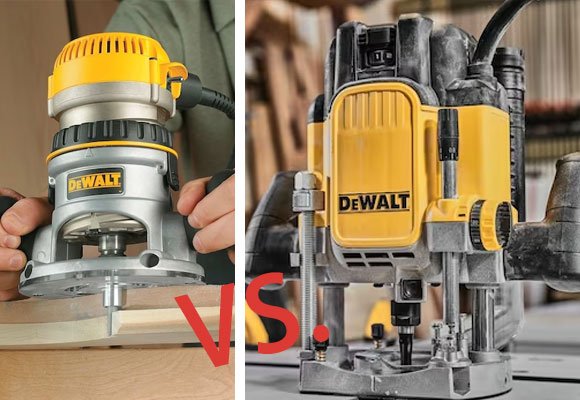
The most frequent culprit behind a wandering depth setting is the plunge locking mechanism. On most routers, this is a cam-action lever or a threaded knob that applies pressure to the plunge columns. If the internal cam has worn down, it no longer provides the necessary friction to grip the steel rod.
When you engage the router, the vibrations travel through the frame, and if the clamp isn’t providing enough force, the weight of the motor housing slowly begins to slide downward, gradually increasing your cutting depth beyond the intended measurement.
Identifying mechanical vibration issues
Vibration is the silent killer of precision. If your router bit is slightly unbalanced or if you’re feeding too aggressively, the resulting chatter will naturally work to loosen any mechanical locks. Always check that the locking knob threads are clean and not stripped. If you can move the router housing up and down while the lock is engaged, the mechanism is failing to provide adequate clamping force.
Troubleshooting Your Depth Stop System
The depth stop rod is the secondary point of failure. This rod is designed to hit a turret or a fixed stop, preventing the router from going deeper than you want. If the nut or collar on this rod vibrates loose, the rod itself will slip, allowing the router to plunge deeper than your initial calibration.
| Component | Common Failure Symptom | Recommended Fix |
|---|---|---|
| Locking Lever | Lever moves on its own | Adjust cam tension nut |
| Depth Rod Nut | Rod slips during plunge | Tighten locking collar firmly |
| Plunge Springs | Inconsistent return force | Clean columns or replace springs |
| Turret Stops | Stops rotate mid-cut | Tighten turret mounting screw |
Cleaning and Maintenance Best Practices
Wood dust acts as a lubricant, which is the exact opposite of what you want in a friction-based locking system. When fine sawdust mixes with microscopic amounts of machine oil or resin from the wood, it creates a slick barrier on your plunge columns. This reduces the grip of your locking mechanism, making it much easier for the router to drift during operation.
Essential maintenance steps
- Wipe down your plunge columns with a dry cloth after every use.
- Use a light application of dry lubricant like PTFE spray if the action feels sticky, but avoid heavy oils.
- Compressed air should be used sparingly to clear out the internal springs and locking channels.
- Inspect the rubber bellows or dust shields for tears that might allow debris into the mechanism.
Is Your Router Bit Creeping?
Sometimes the router isn’t actually plunging deeper; rather, the router bit itself is pulling out of the collet. This is a common misconception that mimics a depth-stop failure. If your bit isn’t seated correctly or if your collet is worn, the centrifugal force and the upward pressure of the cut can cause the bit to slide outward.
This makes your cut appear deeper than it was when you started. Always ensure the shank is inserted at least three-quarters of the way into the collet, and never bottom out the bit against the base of the collet.
Comparing Locking Mechanisms
Understanding how your specific model locks can help you identify why it might be failing. Different manufacturers utilize unique engineering strategies to handle the force of the plunge.
| Lock Type | Mechanism | Pros | Cons |
|---|---|---|---|
| Cam Lever | Eccentric cam | Fast engagement | Wears out over time |
| Threaded Knob | Friction plate | Extremely high force | Slow to adjust |
| Ratchet Lock | Indexed teeth | Can’t slip | Limited adjustment points |
How to Tighten Plunge Mechanisms
If your locking lever feels “loose” even when engaged, you likely need to adjust the tension of the cam. Most routers feature a small nut or bolt on the opposite side of the locking lever. By tightening this nut incrementally, you increase the pressure the lever exerts on the column.
Pro Tip: Always perform a test plunge on scrap material after adjusting your tension nut to ensure the router moves smoothly without binding, as overtightening can cause the plunge columns to scratch or gall.
Diagnosing Worn Plunge Springs
The plunge springs are responsible for returning the router to the “up” position and providing resistance against the depth stop. If these springs have lost their tension, the motor housing may feel “mushy” or unstable. A weak spring means the router isn’t being held firmly against the depth stop rod, allowing for micro-movements that ruin your project. If your router feels significantly easier to plunge than it did when it was new, it’s time to check the spring integrity.
Checking the Depth Turret Index
The depth stop turret is the rotating base that allows you to set multiple depths. It usually features a series of screws or stepped heights. If the turret isn’t properly indexed, the depth stop rod might be landing on the edge of a step rather than the flat surface.
This causes the rod to slip off the step during the cut, leading to a sudden and dangerous increase in depth. Always ensure the turret stop clicks firmly into place before beginning your operation.
When to Replace the Tool
If you have cleaned the columns, adjusted the tension nut, and verified the integrity of the depth rod, yet the router still fails to hold its depth, you may be looking at a catastrophic failure of the casting or the internal cam.
In some cases, the aluminum housing may have cracked near the locking point, preventing it from clamping properly. If the structural integrity is compromised, it’s safer to replace the router rather than attempting to weld or patch a high-speed tool.
Warning: Never attempt to bypass a safety lock or use a makeshift shim to keep your router at a specific depth, as these modifications can shift under load and cause the bit to kick back violently.
Related guides
- Cordless vs. Corded Plunge Routers: Which Makes More Sense?
- Plunge Router vs Fixed-Base Router: Which One to Choose
- Fixed-Base vs Plunge Router: Which One Do You Need?
Frequently Asked Questions
Why does my router bit keep moving?
Bit movement is usually caused by an under-tightened collet or a buildup of resin on the collet interior. Clean the collet and the bit shank with a solvent, and ensure the bit is inserted correctly. If the collet itself is cracked or deformed, it will never hold the bit securely, and you must replace it immediately to prevent the bit from being ejected during use.
Can I lubricate the plunge columns?
You should only use dry lubricants on your plunge columns. Petroleum-based oils or heavy greases will attract sawdust, turning into a sticky paste that increases friction and causes the mechanism to bind or slip. A light coat of silicone-free dry lubricant is usually sufficient to ensure smooth movement without compromising the locking friction required to hold your depth setting.
How do I fix a slipping depth rod?
Check the locking nut or the thumb screw that secures the depth rod. If the threads are stripped, the rod will slip under the vibration of the motor. You can often replace the threaded hardware with a generic bolt from a hardware store. Ensure the rod itself isn’t bent, as a bent rod won’t make square contact with the turret, leading to instability.
Why is my router depth inconsistent?
Inconsistency is often caused by the router not being fully seated against the depth stop before the lock is engaged. Always plunge the router to the desired depth, hold it firmly against the stop, and then engage the locking lever. If you lock the router while it’s still moving, you may accidentally set it at an angle, causing the depth to shift during the cut.
Does vibration affect router settings?
Yes, vibration is the primary enemy of precision settings on any power tool. High-speed routers generate significant harmonic resonance that can loosen knobs, levers, and collars over time. Regularly inspect all fasteners and locking points before starting a project. If your router is vibrating excessively, check that your bit is sharp and balanced, as a dull bit requires more force and causes more vibration.
Conclusion
Maintaining your router’s ability to hold a precise cutting depth is a matter of consistent upkeep and understanding the mechanics of your specific machine. By keeping your columns clean, ensuring your collet is tight, and checking your locking mechanisms for wear, you can prevent the frustration of ruined workpieces.
Take a moment before your next project to inspect the locking tension and verify that your depth stop is secure, as these small steps will ensure your tools perform as accurately as the day you bought them.